
FAQ
--------------------------------------------------------------------------
You can already control the Apps Script projects that run in your organization using the G Suite API permissions settings located in the Admin console (at Security > API Permissions). Using these settings, you can block applications that request access to certain APIs—unless you’ve specifically whitelisted them. App Maker apps, add-ons, and scripts that request certain OAuth scopes (like Gmail, Calendar, Drive, etc.) are just some of the Apps Scripts projects that these settings control.
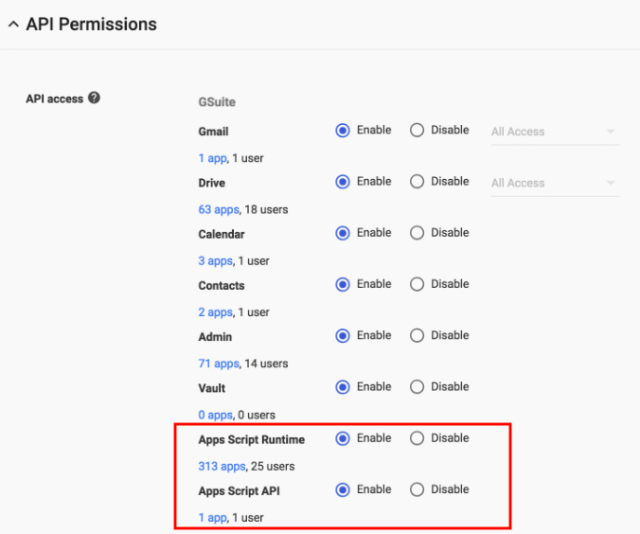
Now you can also control access to projects that request the following scopes:
See the Help Center for instructions on whitelisting connected apps.
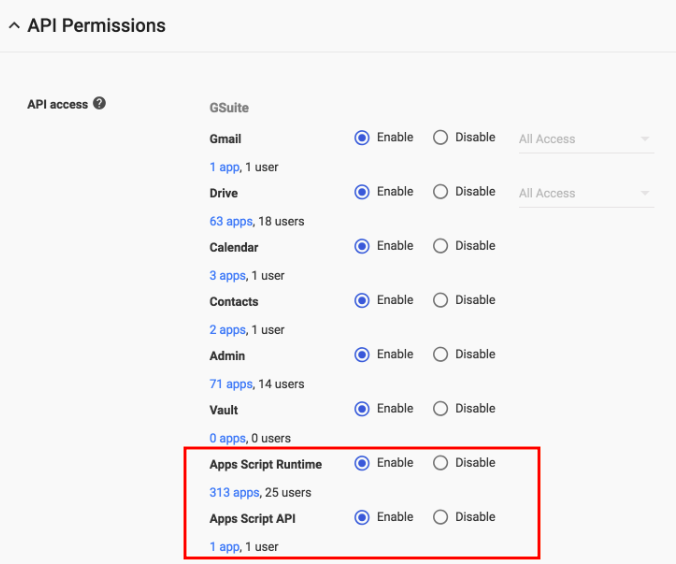
Now you can also control access to projects that request the following scopes:
- Apps Script Runtime - Control access to projects that request certain high-risk scopes specific to Apps Script projects (e.g. UrlFetch, Container UI).
- Apps Script API - Control access to any project (e.g. Apps Script, GCP, AWS, etc.) that requests scopes for Apps Script API (e.g. Manage Projects, Manage Deployments).
See the Help Center for instructions on whitelisting connected apps.
Comments
0 comments
Please sign in to leave a comment.